Sound node
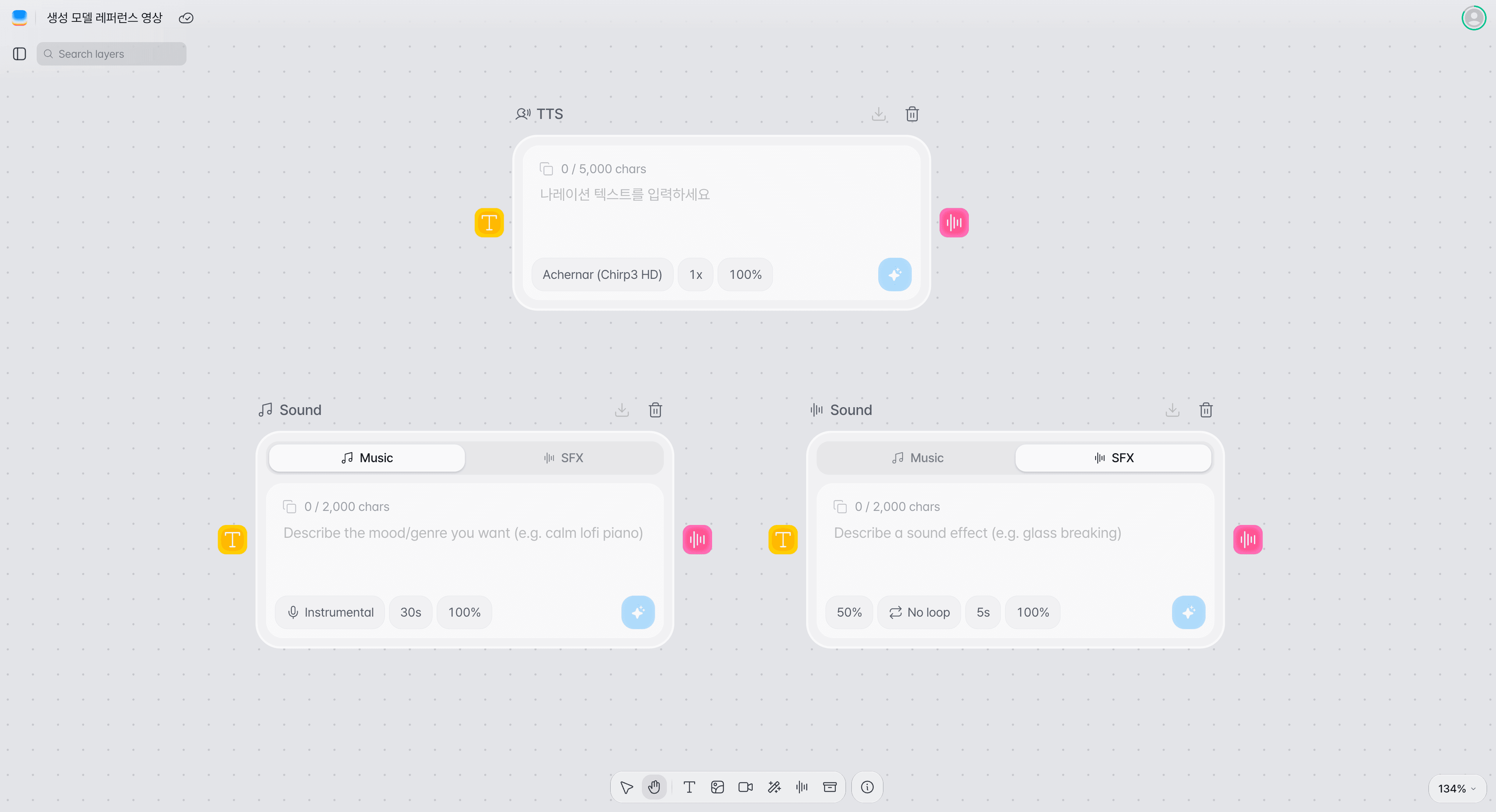
Two nodes make audio on the Canvas. The TTS node turns text into narration, and the sound node makes background music or sound effects from a description. The sound node can also take an audio file you already have.
Node screen
The TTS node and the sound node are separate nodes. The sound node has Music, SFX, and Upload tabs at the top, and its options change with the tab.
Audio you can make
Narration is made in the TTS node; background music and sound effects are made in the sound node. An audio file you already have goes in the sound node's Upload tab.
Narration
Reads the text you enter in the TTS node aloud. Use it for the explanation or the lines in your video.
Background music
Describe the mood and genre you want in the sound node's Music mode to make music up to 10 minutes long.
Sound effects
Describe the sound you need in the sound node's SFX mode to make a sound effect up to 30 seconds long.
Making TTS narration
Enter the narration text in a TTS node, set the voice, speed, and volume, then generate the audio.
Add a TTS node.
Choose TTS (narration) from the toolbar's Audio node button, or from the menu that opens when you right-click an empty spot on the Canvas. You can also press a Composition node's audio input point and choose TTS (narration); the TTS node is added already connected to that input.
Enter the narration text.
Enter the lines or the explanation to be read in the video, up to 5,000 characters. Connect a text node to the input point on the left of the node and the TTS node reads that text instead.
Choose a voice.
Pick a voice from the voice list. All voices in the list are Korean voices; each is marked M or F, and you can listen to it first with its Preview button.
Adjust the speed and volume.
Speed goes from 0.5x to 2x in steps of 0.05, and volume from 0% to 100% in steps of 5%.
Generate the voice.
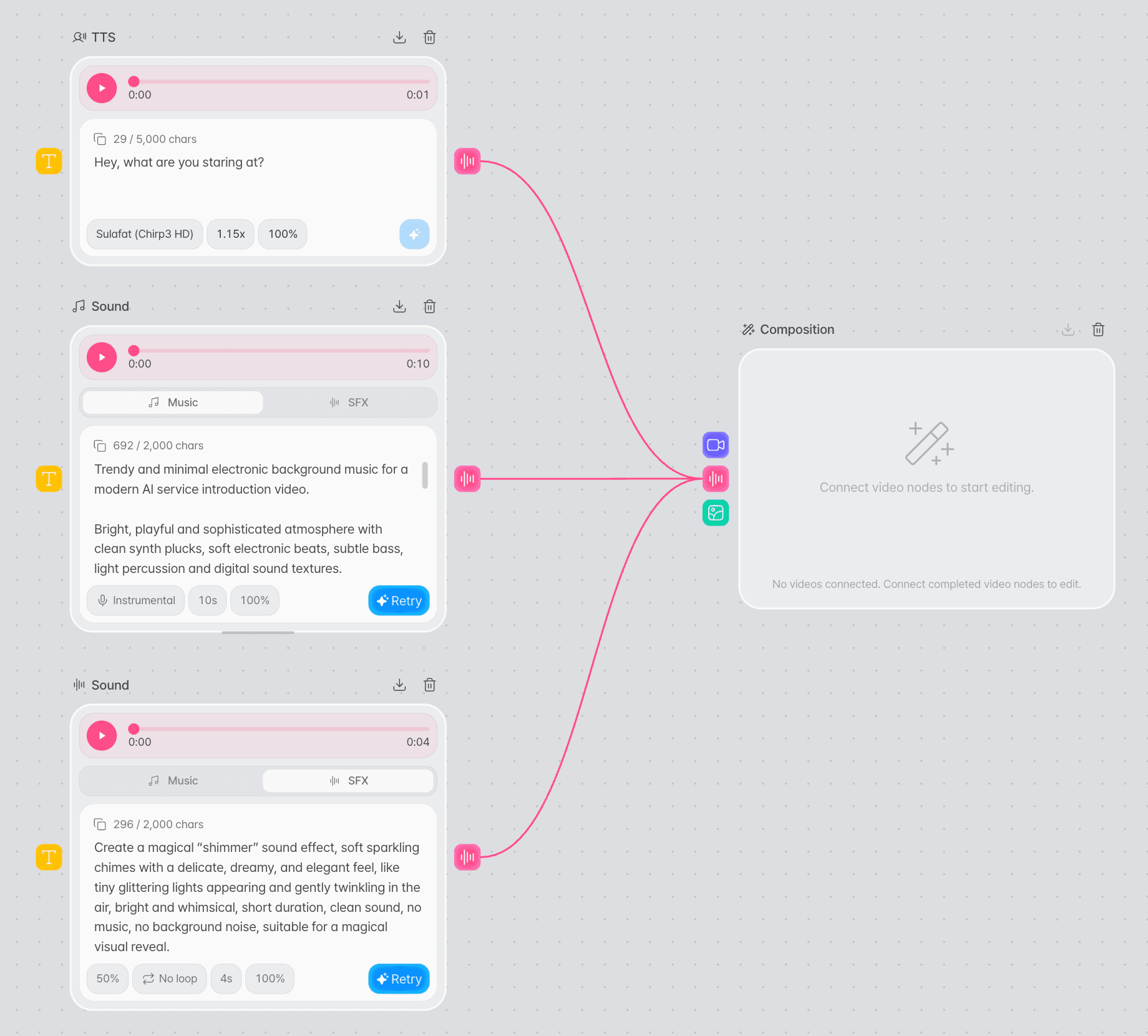
Press the generate button to make the voice, then listen to it right away in the player that appears at the top of the node. To use the voice, drag the node's output point to a Composition node's audio input. Press the output point and choose Add to an edit to add a Composition node connected to this node.
Making music and sound effects
Describe the sound in a sound node, set its options, then generate music or a sound effect.
Add a sound node.
Choose Music or Sound effect from the Audio node button or the right-click menu. Either one adds the same sound node, and until you generate, you can switch between Music and SFX at the top of the node. Choosing Sound (music·SFX) from a Composition node's audio input point adds a sound node set to Music, already connected to that input.
Describe the sound.
For music, enter the mood and genre you want; for a sound effect, the sound you need. You can enter up to 2,000 characters.
Set the options.
Music takes vocals, length, and volume; SFX takes strength, loop, length, and volume. See Sound settings below for the ranges.
Check the credits and generate.
The generate button shows the credits it needs, which depend on the length. Press it to start generating; when it finishes, listen to the result in the player at the top of the node. To use the music or sound effect, drag the node's output point to a Composition node's audio input. Press the output point and choose Add to an edit to add a Composition node connected to this node.
Regenerate if needed.
Once a sound node has a result, its description and options are locked and the generate button becomes Regenerate. Press Regenerate to add a new sound node with the same settings to the right, then change the description or options there and generate again.
Uploading an audio file
Upload an audio file you already have in the sound node's Upload tab to use it in a Composition node.
Add a sound node and choose the Upload tab.
Choose Music or Sound effect from the Audio node button or the right-click menu to add a sound node, then choose the Upload tab at the top of the node. If you drag an audio file onto the Canvas, a sound node is added where you drop it and the file uploads right away.
Upload the audio file.
Drag a file onto the upload area, or click the area to choose a file. You can upload MP3, WAV, M4A, AAC, and OGG files up to 100MB, and listen to the uploaded file in the player at the top of the node.
Once a file is uploaded, the node cannot be switched to the Music or SFX tab. To change the file, click Replace file or drag a new file onto the node.
Adjust the speed and volume.
Set the speed from 0.5x to 2x and the volume from 0 to 100%. You can change both after uploading, and the node's player follows the new speed right away.
Connect it to a Composition node.
Connect the output point to a Composition node's audio input, or press the output point and choose Add to an edit. The editing screen uses the speed and volume set when the node is first connected. After that, adjust them in the editing screen.
TTS settings
- Voice
Korean voices
Pick a voice from the list. The first voice in the list is selected to begin with.
- Speed
0.5x–2x
Adjusted in steps of 0.05. The default is 1x.
- Volume
0%–100%
Adjusted in steps of 5%. The default is 100%, and it becomes the starting volume of this audio clip in the Composition editing screen. It does not change what you hear in the node or the file you download.
Sound settings
The sound node's options differ between Music, SFX, and Upload.
| Option | Music | SFX | Upload |
|---|---|---|---|
| Vocals | Instrumental (default), With vocals | — | — |
| Strength | — | How strongly the description shapes the result. 0–100% in steps of 5%, default 50% | — |
| Loop | — | No loop (default), Loop. With Loop on, the sound effect is made so its end runs smoothly into its start. | — |
| Length | Up to 10 min, in steps of 1s, default 30s | 0.5–30s, in steps of 0.5s, default 5s | The length of the uploaded file |
| Speed | — | — | 0.5–2x in steps of 0.05, default 1x |
| Volume | 0–100% in steps of 5%, default 100% | 0–100% in steps of 5%, default 100% | 0–100% in steps of 5%, default 100% |
| Credits | 20 per 5s (120 for 30s) | 10 per second (50 for 5s) | — |
Input and output
| Item | TTS node | Sound node |
|---|---|---|
| Input | Text you enter (up to 5,000 characters) or one connected text node | A description you enter (up to 2,000 characters). Upload: the audio file you upload (up to 100MB) |
| Settings | Voice, speed, volume | Music: vocals, length, volume / SFX: strength, loop, length, volume / Upload: speed, volume |
| Output | MP3 voice | MP3 music or sound effect, or the uploaded audio file |
Connecting to other nodes
Connect a TTS node or a sound node to a Composition node's audio input to put narration, music, sound effects, or an uploaded audio file in your video. Choose Add to an edit from the output point to add a Composition node that is already connected.
Tips
Keep a script you may revise in a text node.
Once generated, the TTS node's text can no longer be edited. If the script sits in a connected text node, you can revise it there and generate again in the same TTS node.
Set the volume in the node first.
The volume you set in the node becomes the audio clip's starting volume in the Composition editing screen. Setting background music lower than the narration saves adjusting it later in the editing screen.
Troubleshooting
| Problem | What to check |
|---|---|
| The generate button cannot be pressed | A TTS node needs text and a voice, and a sound node needs a description. A TTS node that has already generated can be pressed again once you change the voice or the connected text. Changing only the speed does not re-enable it, so add a new TTS node instead. |
| A sound node's description or options cannot be changed | They lock once generation finishes. Press Regenerate to make a new node with the same settings, then change them there. |
| A sound node's tab cannot be changed | The tab cannot be changed once the node has generated or a file is uploaded. To use another tab, add a new sound node. |
| An audio file will not upload | Check that the file is MP3, WAV, M4A, AAC, or OGG and no larger than 100MB. If a message says the upload failed, try again a little later. |
| An Upgrade required window opens | Generating in TTS and sound nodes, uploading audio files, and connecting them to a Composition node are available on the Lite plan or higher. |
| A Not enough credits window opens | Your credit balance is lower than the credits shown on the generate button. A shorter length needs fewer credits. |
| The audio is missing from the Composition editing screen | Check that a TTS or sound node that has finished generating or uploading is connected to the Composition node's audio input. A new sound node made with Regenerate has to be connected separately. |
| A volume or speed changed in the node does not reach the editing screen | The node's volume, and the speed on the Upload tab, apply only when the node is first connected to a Composition node. After that, adjust them in the editing screen. |
| A text node will not connect to a sound node | Type the sound node's description in the node itself. Of the audio nodes, only the TTS node accepts a text node. |
Frequently asked questions
How are the TTS node and the sound node different?
They are separate nodes. The TTS node reads the text you enter as narration, and the sound node makes background music or sound effects from a description. Narration can only be made in the TTS node.
Which languages are the voices in?
All voices in the voice list are Korean voices.
How far can the TTS speed be adjusted?
From 0.5x to 2x in steps of 0.05.
Can I make music with vocals?
Yes. In the sound node's Music mode, press Instrumental to switch it to With vocals, then generate. The default is Instrumental.
How long can music and sound effects be?
Music can be up to 10 minutes long, and sound effects up to 30 seconds.
What can I do if I do not like the result?
In a sound node, press Regenerate and a new node with the same settings appears to the right; change the description or options there and generate. In a TTS node, change the voice or the connected text to generate again in the same node. To redo it with different typed text or a different speed, add a new TTS node. Connect the new node to the Composition node's audio input, and disconnect the earlier one.
Can I upload an audio file I already have to a node?
Yes. In the sound node's Upload tab, you can upload MP3, WAV, M4A, AAC, and OGG files up to 100MB. Dragging an audio file onto the Canvas also adds a sound node.
Where do I use the sound I generated?
Connect it to a Composition node and, in the editing screen, each node goes on its own audio track, starting at the beginning of the timeline. Music and sound effects get a 1-second fade-in and a 2-second fade-out by default. Uploaded files get no fade. You can also download an MP3 file with the download button at the top of the node.